
AusweisApp Bund
Governikus Service GmbHLibraries & Demo
3.788.00 Reviews
- Version
- 2.6.2
- Installs
- 10.00M
- Age Rating
- Everyone
Screenshots
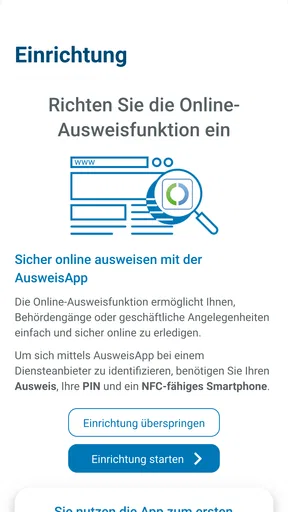
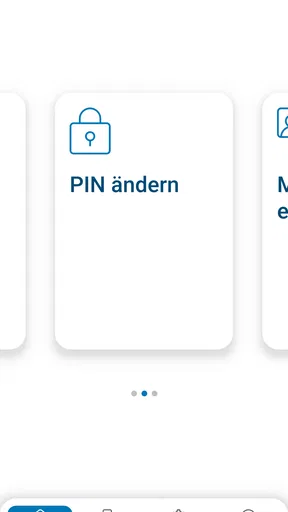
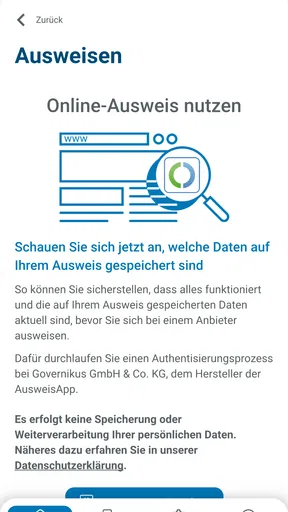
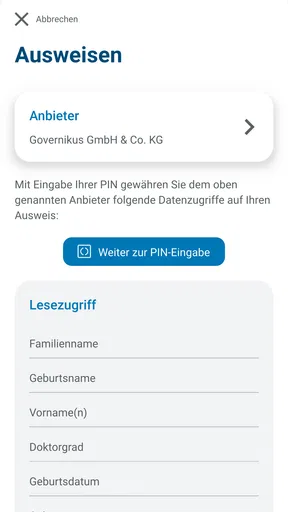
Our Review of AusweisApp Bund
 Analysis by Appyee
When I need to prove my identity online with a German electronic ID, I would rather use a dedicated tool than guess whether a random website or browser extension is handling the process correctly. That is where AusweisApp Bund fits. It is a free utility from Governikus GmbH & Co. KG, placed in the Libraries & Demo section, and its purpose is refreshingly focused: it helps identify me securely online with a compatible German identity document and a phone that supports the required contactless reading.
My first impression is that this is not an app I open for entertainment or everyday browsing. It is more like a digital key that I keep ready for specific administrative tasks. The value appears when a public service or another supported online service asks for electronic identification. In that moment, a clear, official-looking workflow matters more than a long feature list.
The important distinction is that AusweisApp Bund is a companion for online identification, not a general document wallet. It does not replace every form of identity verification, and it cannot make an incompatible phone, inactive identity function, or unsupported service work. Used for the situation it was designed for, though, it can remove a surprisingly awkward step from dealing with government services online.
How the basic identification workflow feels
The normal process begins outside the app. I first reach a service that supports electronic identification and choose the relevant identification option. AusweisApp Bund then becomes the tool that connects the service with the identity document. This separation is useful because it keeps the app’s job narrow: it is there to handle the secure identification stage rather than act as a portal for every online service.
Before starting, I would make sure the identity document is available and that the phone is ready for contactless communication. I would also avoid beginning the process while rushing between tasks. The app may be free, but the surrounding requirements still matter: the document must be suitable for electronic identification, the required access information must be available, and the phone must be capable of communicating with the document.
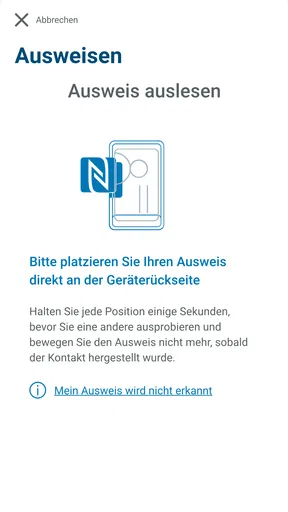
Once the process starts, the phone is used to read the document wirelessly. In practical terms, this means holding the document and phone together in the right position and keeping them still long enough for the exchange to complete. That sounds simple, but it is one of the places where first attempts can feel less smooth than expected. A thick phone case, a wallet case, or moving the document too quickly can turn a short step into repeated attempts.
My advice is to remove anything between the phone and the document that might interfere, then place the document on a stable surface rather than trying to hold everything in mid-air. If the reading does not begin immediately, I would reposition the document gradually instead of waving it around. NFC reading is often more sensitive to alignment than people expect, and patience here is usually more useful than repeatedly restarting the whole identification process.
The app is also easier to understand when I treat it as part of a chain. The website requests identification, the app handles the secure reading stage, and the service receives the result. If something fails, the problem may be at any of those points. A user who assumes the app alone controls the entire process may waste time changing settings when the actual issue is the service session or the phone’s contactless communication.
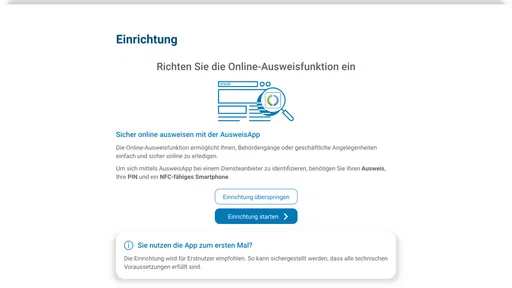
That is one reason I like testing the setup before an important deadline. I would open a service that supports the process, check that the phone can detect the document, and confirm that I know the access details. This is a better habit than discovering a forgotten code or an incompatible device when a form has to be submitted immediately.
What the app is good at in everyday situations
A realistic example would be handling an online administrative request from home after work. Instead of printing documents, scanning an identity card, and waiting for another verification method, I can use the electronic identification route if the service offers it. I place the document beside the phone, follow the prompts, and return to the service once the identity check is complete.
This is especially useful for people who regularly use digital public services and already have the necessary identity document and access information. It can also help someone who dislikes sending copies of an identity card by email or uploading them to an unfamiliar third-party process. Electronic identification is not automatically the best choice for every service, but it can be a more deliberate alternative to making and distributing document scans.
At the same time, I would not recommend installing it simply because it sounds useful in theory. If I rarely use services that support this identification method, the app may spend most of its life untouched. It is also not the right solution for someone who expects a normal selfie-based verification process, a passport-storage app, or a universal login manager. Its usefulness depends heavily on the service being accessed and on the user having a compatible identity setup.
Settings and preparation that save frustration
The most valuable preparation is not a complicated configuration trick. It is checking the phone’s contactless communication setting before beginning. If NFC is disabled, the app cannot read a contactless document, no matter how many times I retry. On some phones, the setting is easy to find in quick controls; on others, I need to look through the system settings. I would check this before opening the service rather than after a failed scan.
I would also review the app’s available guidance and connection options before a real transaction. AusweisApp Bund can be used in situations where the phone is involved directly, and the exact handoff can depend on how the service starts the identification request. The practical lesson is to follow the route presented by the service instead of launching the app independently and expecting it to know which transaction I intend to complete.
Keeping the app current is another sensible habit. The installed version is 2.5.5, and updates can matter for compatibility with current operating-system behavior and supported identification flows. I would not treat an update as a guarantee that every problem disappears, but running an old version adds an avoidable variable when troubleshooting.
The minimum operating-system requirement is Android or iOS 9. That makes the stated compatibility range broad, but it does not mean every older phone will provide an equally comfortable experience. Contactless hardware, manufacturer-specific system behavior, battery condition, and the phone’s physical design can all affect the process. In other words, the operating-system requirement is a starting point, not a promise that every device will scan effortlessly.
There is also a privacy habit worth adopting: I would begin identification only from a service I recognize and a session I intentionally started. The app’s presence does not make an unknown website trustworthy. AusweisApp Bund can handle its part of the identification process, but I still need to check the address, the service name, and what information the service is asking me to provide. Secure technology does not remove the need for ordinary caution.
For repeat use, I would keep the document and the phone in predictable places and remember where the relevant access information is stored. That sounds mundane, but it changes the experience. The first use is about learning the sequence; later uses become much faster when I do not have to search for the document, activate NFC, and remember the access details at the same time.
Faster patterns for people who use it often
Experienced use is mostly about reducing avoidable decisions. I would start the identification request on the service, activate the phone’s contactless function beforehand, remove a thick case if it causes trouble, and place the document on a flat surface. This creates a repeatable routine instead of treating every scan as an experiment.
Another useful pattern is to separate “can my phone read the document?” from “can this service complete the transaction?” If I am setting up the app for the first time, I would test the reading stage when I have time to troubleshoot. Then, during an important application, I can focus on the service’s instructions rather than wondering whether the phone itself is suitable.
I also prefer keeping the phone unlocked and free from unnecessary interruptions during the process. A call, notification, or accidental screen change may not permanently break anything, but it can make the handoff confusing. Starting with a charged phone and a stable connection is similarly sensible, especially when the identification session is tied to a browser page that may expire if left open too long.
When a scan fails, I would use a fixed troubleshooting order. First, check that contactless communication is enabled. Next, remove the case or nearby cards that could interfere. Then place the document and phone together in a different position and hold them still. After that, restart the identification request if the service session appears to have timed out. This order is faster than changing several things at once because it shows which adjustment solved the problem.
There is a subtle trade-off between convenience and control here. Saving time by preparing everything in advance is helpful, but I would not save identity-related details in an insecure note just to avoid remembering them. A repeatable workflow should make the process calmer without weakening the protection around the document or its access information.
For households with more than one person using the same phone, I would be especially careful about the handoff. The person completing the identification should be the one who starts and confirms the transaction, and the document should not be left on the phone after the process. The app is designed for a deliberate identity check, not for casually passing a device around while several sessions are open.
Where the limits become important
The largest limitation is dependency. AusweisApp Bund cannot force a website to support electronic identification. If a service offers only a video-identification process, a document upload, or a traditional account login, this app does not replace those options. That is why I see it as a specialist tool rather than a universal solution.
Hardware is another boundary. A phone may meet the operating-system requirement yet lack the necessary contactless capability or behave poorly during reading. The app cannot add hardware through software. Users with an older or unusual device should check the phone’s capabilities before relying on it for a time-sensitive task.
The physical reading step can also be temperamental. Contactless communication is convenient, but it is not as forgiving as typing a password. Position, movement, cases, and nearby cards matter. Someone who expects to tap the document for a second and walk away may be disappointed. I consider this a manageable weakness, but it is still a weakness, particularly for users with limited dexterity or a phone design that makes alignment awkward.
There is a learning curve around understanding which screen belongs to the app and which belongs to the service. A beginner may wonder whether the identification has finished when the app returns to the browser, or may restart the process unnecessarily. Reading the on-screen instructions fully is worthwhile. The app works best when I follow the transaction as a connected sequence rather than treating every transition as an error.
Compared with scanning an identity document, electronic identification can reduce the need to create and send a copy, but scanning may still be simpler for a service that accepts it directly. Compared with video identification, this approach avoids arranging a live call, yet it requires compatible hardware and the correct electronic identity setup. Compared with a password manager, it solves a completely different problem: it proves identity for supported services instead of storing ordinary website credentials.
That comparison helps clarify who should skip it. If I need frequent access to services that do not support this method, a document-scanning workflow or the service’s own verification option may be more practical. If I am buying a phone without contactless hardware, installing this app will not change that decision. And if I want one application to store passports, driving licences, tickets, and passwords, this is not the product I would choose.
On the other hand, people who regularly interact with German online administration may find the narrow focus worthwhile. The app has reached over ten million installs, and its average rating is 3.3 from around sixty-two thousand ratings. I read that combination as a sign of broad usefulness mixed with real-world friction: many people need the function, but contactless setup and service compatibility can strongly influence whether the experience feels smooth.
My verdict after using it as a repeatable tool
I would recommend AusweisApp Bund to anyone who has a suitable German electronic identity document, a compatible phone, and a genuine need to use online services that support this route. It is free, rated for Everyone, and its focused purpose makes more sense once I stop expecting it to behave like a general-purpose identity wallet.
The developer, Governikus GmbH & Co. KG, has built an app that is most useful when treated as infrastructure: not exciting, not something I browse for fun, but valuable when a secure identification step needs to happen without printing and mailing paperwork. The release date was March 27, 2017, and the current version remains a practical point of reference for users checking whether their installation is up to date.
My strongest recommendation is to prepare before the deadline. Check contactless communication, make sure the document and access information are available, remove anything that interferes with reading, and test the process through a supported service when there is time to recover from a mistake. Those habits matter more than repeatedly reinstalling the app.
In the end, I see AusweisApp Bund as a dependable specialist rather than a polished all-in-one identity platform. It earns a place on my phone when I need electronic identification, but I would not install it expecting every online verification task to move into one app. If the service, document, and phone all line up, it can make an otherwise tedious administrative moment considerably more direct.
Privacy and Permissions
See what permissions an app requests and how it handles your data.
- Wi-Fi connection information
- view Wi-Fi connections
- Other
- view network connections, allow Wi-Fi Multicast reception, connect and disconnect from Wi-Fi, full network access, control Near Field Communication, control vibration
Verdict
Strengths of AusweisApp Bund
- Official German government app for using the online ID function
- Strong encryption helps protect personal identification data
- Supports German ID cards, residence permits, and eID cards
- Can connect with NFC-enabled smartphones without extra hardware
- Clear guidance helps users complete identification procedures
Limitations of AusweisApp Bund
- Requires an activated online ID function and a valid PIN
- Only useful with compatible German identity documents
- NFC performance can vary between smartphone models
- Some services may require additional registration or verification
- Setup can be confusing for users unfamiliar with eID procedures
Similar Picks in This Category
View All
PGT: GFX, Launcher & Optimizer
Trilokia Inc.4.5

Cardboard
Google LLC3.2

Gamers GLTool with Game Tuner
Trilokia Inc.4.5

Multi Web Chat - Read Secretly
World Scan & Cleaner3.8

App Cloner Premium & Add-ons
App Listo1.9

Holy Quran Offline Reading
JedyApps4.4
Frequently Asked Questions
What is AusweisApp Bund used for?
AusweisApp Bund is the official application for using Germany’s online identification function, known as the Online-Ausweisfunktion. It allows you to identify yourself digitally with a German electronic identity document, such as an identity card, electronic residence permit, or eID card for EU citizens. Supported websites can use it for services such as government applications, registration procedures, contracts, and account verification without requiring a separate in-person appointment.
What documents and requirements are needed to use AusweisApp Bund?
To use AusweisApp Bund, you need a compatible German electronic identity document with the online identification function activated, your personal six-digit PIN, and a device with NFC support or a compatible external card reader. Your smartphone or tablet must also meet the app’s current technical requirements. If you have forgotten your PIN or never set one, you may need to obtain or reset it through the responsible authority before using online identification.
Can I use AusweisApp Bund with an iPhone or Android phone?
Yes, AusweisApp Bund is available for both Android and iOS devices, provided the phone meets the required operating-system and hardware specifications. NFC is generally needed so the device can read the electronic identity document. Before downloading, check whether your smartphone supports NFC and whether its operating system is up to date. Some older devices may not work correctly, even if the app itself can be installed.
Is AusweisApp Bund safe and does it store my personal data?
AusweisApp Bund is designed for secure electronic identification and is provided by Germany’s Federal Office for Information Security and the Federal Office of Administration. During an identification process, the app displays which information a service provider is requesting, allowing you to review the request before approving it. The app does not function as a general digital wallet, and users should still verify the website and service they are connecting to before entering their PIN.
How do I use AusweisApp Bund to log in to an online service?
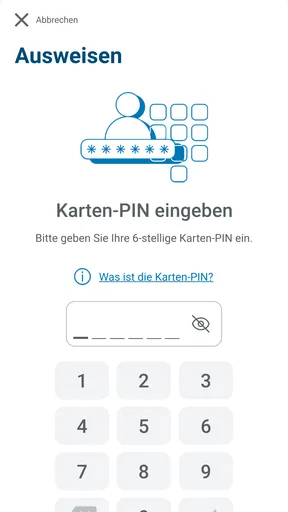
First, open a participating website and select the option to identify yourself with the online ID function. The website will guide you to AusweisApp Bund, where you can review the requested data and begin the identification process. Enter your PIN when prompted, then hold your electronic identity document against the NFC area of your phone. Keep the document in place until the reading process finishes and the service confirms your identity.
